

.avif)
If you run three or even 300 locations, why should you build duplicate versions of the same campaign?
As of today, you don't have to. And with Memorial Day promos and summer pushes right around the corner, the timing couldn't be better.
This month brings two major capabilities, along with a set of inbox, campaign, and chatbot improvements. Here's what just changed for your business.
Here is everything new in May 2026.
Not a Replify user yet? Book a demo with our team to see what leading fitness operators are already using.
Watch Replify's May 2026 Product Update
Analysis Fields: Build Structured Post-Conversation Outputs
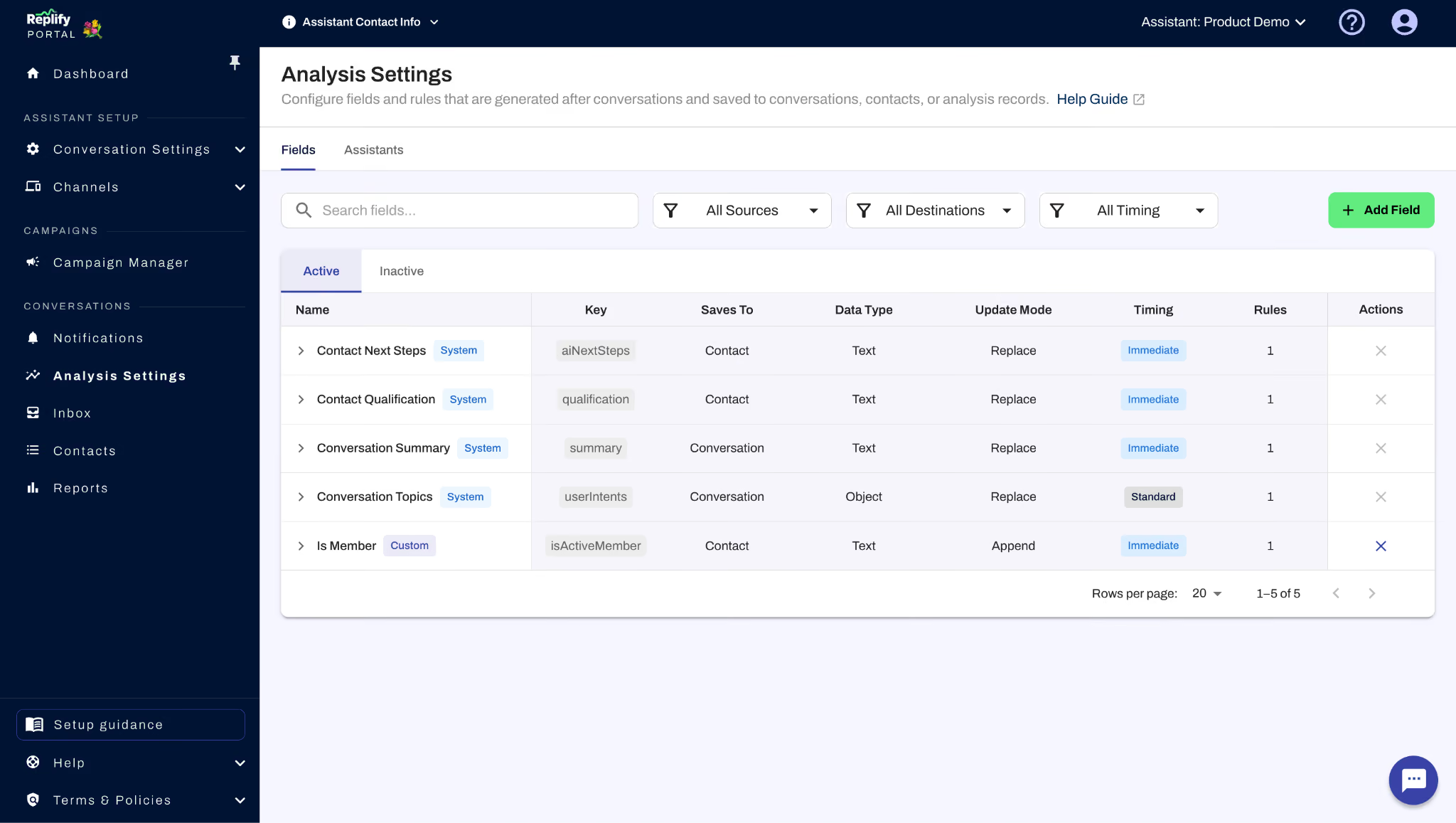
Until now, the analysis output at the end of every conversation followed a fixed structure: qualification, summary, and next steps. Analysis Fields let you go beyond that by defining your own custom slots that the AI fills in after a conversation ends.
You set what each field means and how it should be answered, and the model returns structured values you can act on. A few things this opens up:
- Tailored post-conversation data. Ask for a short recap, a numeric score, sentiment, readiness to buy, or anything else your team already tracks in a spreadsheet or CRM.
- Your own topic and category lists. Supply the themes you care about like product lines, common objections, reasons for the call, and have your AI assistant evaluate each conversation against them.
- Formatted output for downstream tools. Control how responses are shaped so they match what another system expects: plain text, date/time, boolean, etc.
- Direct CRM delivery via Zapier. Connect the analysis payload through Zapier or a similar automation so those fields land on leads, tickets, or custom objects automatically, without copy-paste.
If you already use Analysis Settings, that's where you'll find the new Fields section. The portal walks you through each field separately so you can build as few or as many as your workflow needs. Learn more about Analysis Settings.
Multi-Assistant Campaigns: Run One Campaign Across Every Assistant
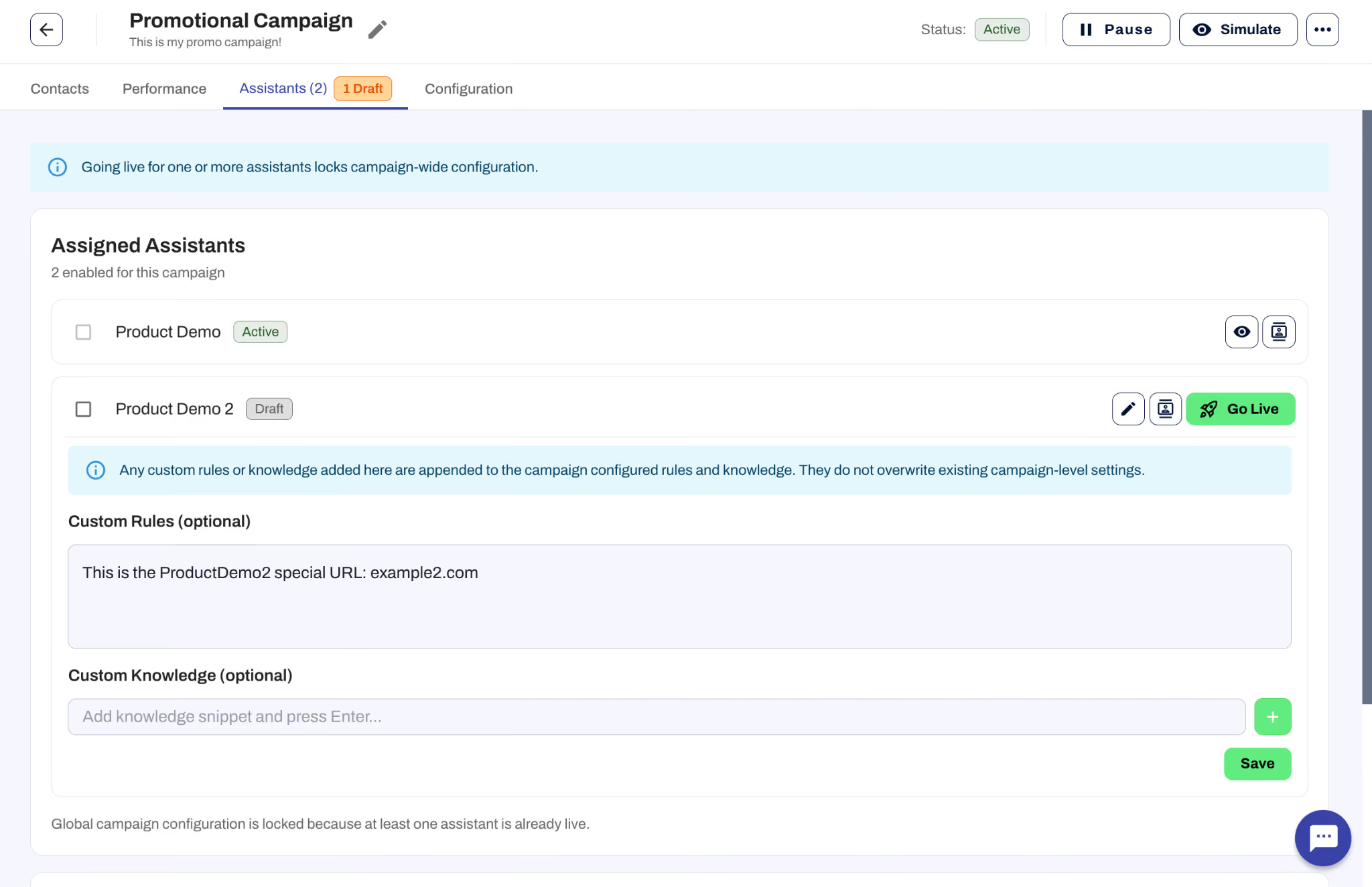
Previously, running the same campaign across multiple assistants meant cloning it for each one. Multi-Assistant Campaigns changes that: you create one campaign and select every assistant that should participate.
- A single shared plan. Scheduling, channels, core messaging, and eligibility rules are defined once and apply to all participating assistants.
- Per-assistant differences, without duplicate campaigns. Where locations or brands diverge (pricing, URLs, wording, extra knowledge, or rules) you configure those differences within the same campaign rather than maintaining parallel copies.
- Staged go-live. Start with one assistant to confirm messaging and channels, then expand to others when you're ready.
To use it, enable Multi-Assistant Campaign in Campaign Basics, or share an existing draft via Share Campaign on the campaign list. Learn more about Multi-Assistant Campaigns.
Inbox Improvements
Several updates make the Inbox faster and easier to navigate:
- Filters. Filter your Inbox by channel and by date range to zero in on the conversations that matter right now.
- Search in timeline. When you search on a keyword, you can jump through each match in the conversation timeline instead of scrolling manually to find them.
Campaign Improvements
- New API actions. The Campaign Contact API now supports updateOnly and upsert actions. Use updateOnly when your process might include contacts that aren't in the campaign and you don't want them added automatically. If no action is specified, the API defaults to upsert.
- Change contact status in the UI. You can now set a campaign contact's status to Complete or Disqualified directly from the contact list, without needing to go through individual records.
- Simulate from the edit view. The Simulate button is now available at the bottom of the campaign edit view so you can test without navigating away.
Chatbot Improvements
- Links shared by your assistant in the chatbot now display as friendly clickable text instead of raw URLs.
What These Updates Mean for Your Team
Analysis Fields and Multi-Assistant Campaigns are both aimed at the same problem: reducing the manual work that comes with scale. Analysis Fields cut down on post-call data entry and make it easier to route structured information into your CRM. Multi-Assistant Campaigns eliminate the overhead of maintaining duplicate outreach across locations. Together with the inbox, campaign, and chatbot improvements, this month's release continues Replify's investment in tools built for teams managing high volumes across multiple assistants.
If you have questions about any of these features or want help getting set up, reach out to your Replify account manager or contact us at replify.ai.
Not a Replify user yet? Book a demo with our team.
Replify May 2026 Product Release FAQ
What are Multi-Assistant Campaigns in Replify?
Multi-Assistant Campaigns let you create a single outreach campaign and share it across every assistant in your organization. Instead of cloning the same campaign for each location, you define scheduling, channels, messaging, and eligibility rules once. Where locations or brands need differences like pricing, URLs, or local wording, you configure those within the same campaign rather than maintaining separate copies.
What are Analysis Fields?
Analysis Fields let you define custom data slots that the AI fills in after every conversation. Instead of being limited to the default qualification, summary, and next steps, you can ask for anything your team tracks: sentiment, readiness to buy, numeric scores, topic categories, or formatted output for downstream tools. Fields are configured in Analysis Settings and can be connected to your CRM via Zapier.
Can I customize which topics Replify tracks in conversations?
Yes. With Analysis Fields, you can supply your own topic and category lists, like product lines, common objections, or reasons for the call, and have your AI assistant evaluate each conversation against them.
Can I send Analysis Fields data to my CRM automatically?
Yes. Analysis Fields output can be delivered to your CRM, helpdesk, or any other system through Zapier or a similar automation tool. You can control the format of each field (plain text, date/time, boolean, etc.) so the data matches what your downstream system expects.
What changed in the Replify Inbox?
You can now filter conversations by channel and date range to narrow down to specific conversation types or time windows. Keyword search now includes timeline navigation so you can jump through each match in a conversation instead of scrolling manually.
What campaign improvements were included in this update?
The Campaign Contact API now supports updateOnly and upsert actions. You can set a contact's status to Complete or Disqualified directly from the contact list. And the Simulate button is now available in the campaign edit view so you can test without navigating away.
Do Replify chatbots share links as clickable text now?
Yes. Links shared by your AI assistant in the chatbot now display as friendly clickable text instead of raw URLs.
Will my existing Analysis Settings carry over?
Yes. The previous qualification, summary, and next step settings were migrated automatically. Analysis Fields is a new capability added on top of that existing foundation.
Related Articles
Replify & ABC AI Agents Product Updates: Faster Inbox, Natural Voice Greetings, Redesigned Contacts
Replify, now part of ABC Fitness, shipped updates across Chatbot, Voice, Contacts, Inbox, and Connected Apps to make the platform faster for your front desk. See what's new.
.avif)
AI Receptionist and AI Sales Updates August 2026
Your AI receptionist and AI sales agents just got updated. Updates include editing live campaigns, faster setup, inbox management, and more

AI Case Studies at Gyms, Studios, and Health Clubs
Every AI receptionist and AI sales case study KPI in one place. 200+ gyms, studios, clubs, and salons.

Heading
Lorem ipsum dolor sit amet, consectetur adipiscing elit. Suspendisse varius enim in eros elementum tristique. Duis cursus, mi quis viverra ornare, eros dolor interdum nulla, ut commodo diam libero vitae erat. Aenean faucibus nibh et justo cursus id rutrum lorem imperdiet. Nunc ut sem vitae risus tristique posuere.
Heading
Lorem ipsum dolor sit amet, consectetur adipiscing elit. Suspendisse varius enim in eros elementum tristique. Duis cursus, mi quis viverra ornare, eros dolor interdum nulla, ut commodo diam libero vitae erat. Aenean faucibus nibh et justo cursus id rutrum lorem imperdiet. Nunc ut sem vitae risus tristique posuere.
Heading
Lorem ipsum dolor sit amet, consectetur adipiscing elit. Suspendisse varius enim in eros elementum tristique. Duis cursus, mi quis viverra ornare, eros dolor interdum nulla, ut commodo diam libero vitae erat. Aenean faucibus nibh et justo cursus id rutrum lorem imperdiet. Nunc ut sem vitae risus tristique posuere.
Heading
Lorem ipsum dolor sit amet, consectetur adipiscing elit. Suspendisse varius enim in eros elementum tristique. Duis cursus, mi quis viverra ornare, eros dolor interdum nulla, ut commodo diam libero vitae erat. Aenean faucibus nibh et justo cursus id rutrum lorem imperdiet. Nunc ut sem vitae risus tristique posuere.
Heading
Lorem ipsum dolor sit amet, consectetur adipiscing elit. Suspendisse varius enim in eros elementum tristique. Duis cursus, mi quis viverra ornare, eros dolor interdum nulla, ut commodo diam libero vitae erat. Aenean faucibus nibh et justo cursus id rutrum lorem imperdiet. Nunc ut sem vitae risus tristique posuere.
Heading
Lorem ipsum dolor sit amet, consectetur adipiscing elit. Suspendisse varius enim in eros elementum tristique. Duis cursus, mi quis viverra ornare, eros dolor interdum nulla, ut commodo diam libero vitae erat. Aenean faucibus nibh et justo cursus id rutrum lorem imperdiet. Nunc ut sem vitae risus tristique posuere.