

This month, we shipped one of the biggest time-saving updates in Replify's history, along with a batch of campaign and platform improvements designed to make managing your AI assistants faster and easier.
Here is everything new in March 2026.
Not a Replify user yet? Book a demo with our team.
Bulk Edit AI Assistants Across Locations in One Flow
If you manage multiple Replify assistants, whether across locations, brands, or use cases, you know how tedious it can be to update each one individually. That changes now.
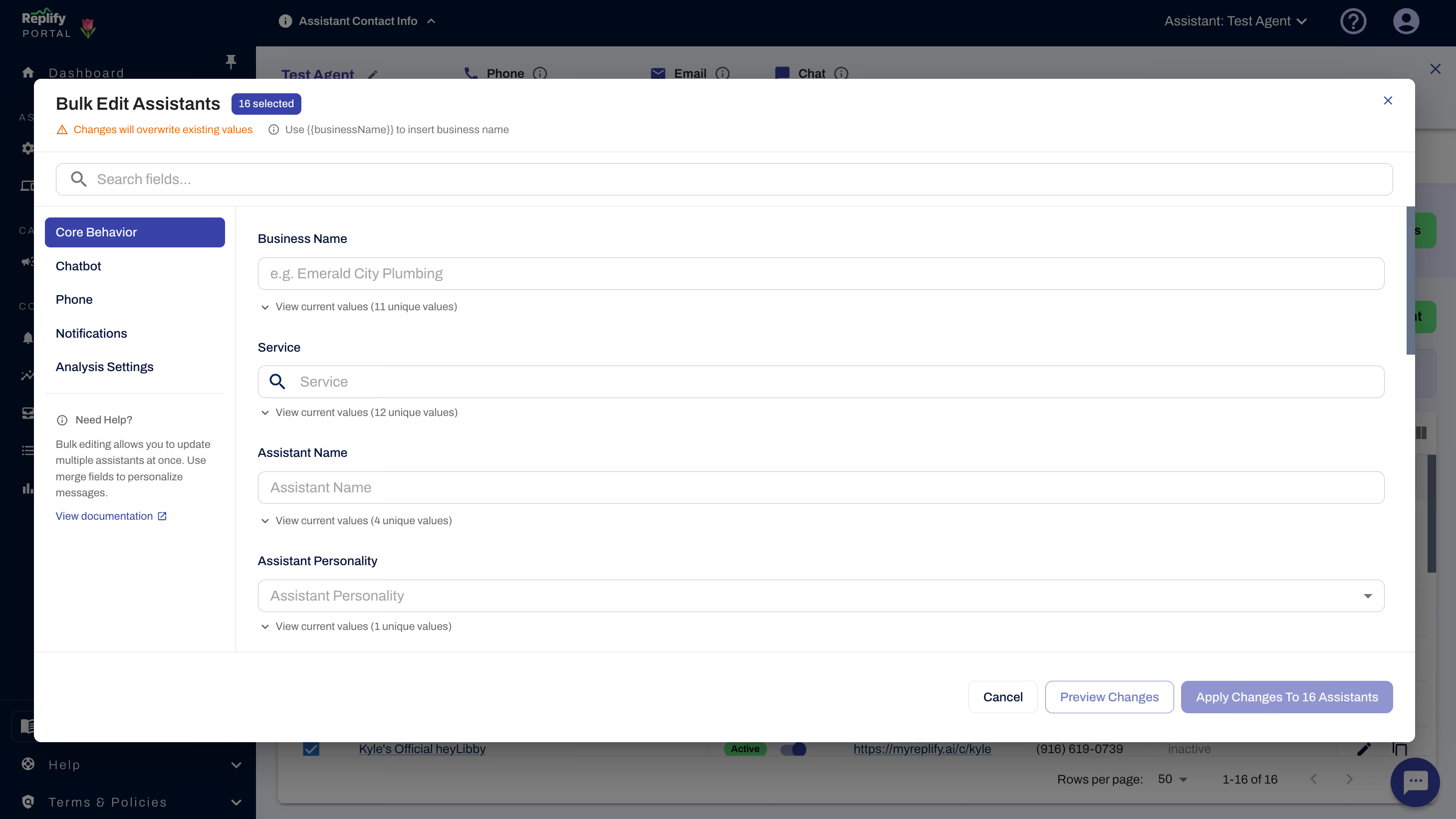
From the Manage Assistants screen, you can select a group of assistants, click Edit, and push shared changes across all of them in a single flow. Bulk editing works across core behavior settings, custom rules, chatbot configuration, phone settings, and notifications. (Read the Replify bulk-edits documention)
Two features make this especially powerful for multi-location operators:
The {{businessName}} placeholder lets you write one set of instructions that automatically adapts to each assistant's location. Instead of manually editing "Welcome to Gold's Gym Torrance" and then "Welcome to Gold's Gym Pasadena," you write it once with the placeholder and Replify fills in the right name for each assistant.
Append mode for rules lets you add new Global Conversation Rules or Phone Rules without overwriting what is already configured for each assistant. This means you can roll out a new policy, like a holiday schedule or a promotion script, across every location without disturbing existing rules.
For teams running 10, 50, or 100+ assistants, this eliminates hours of repetitive configuration work.
AI Campaign Improvements That Boost Deliverability and Control
Replify campaigns got a round of updates focused on reliability, compliance, and usability.
Weekend sending is now available. Previously, outreach campaigns were limited to weekday delivery windows. You can now schedule sends on Saturdays and Sundays, which is especially useful for gyms and fitness studios whose prospects are most responsive on weekends.
Built-in text message guidance helps you write compliant, high-deliverability messages before you hit send. The editor now flags common issues like missing business names, flagged link shorteners, and other patterns that carriers tend to filter. This reduces the risk of your messages getting blocked or landing in spam.
On the management side, we added better filtering, sorting, and status visibility across your campaign list. You can now see at a glance which campaigns are active, paused, completed, or encountering issues, and drill into performance without opening each one.
Replify Platform Updates That Speed Up Day-to-Day Work
We also shipped several quality-of-life improvements across the platform:
Jump to latest message lets you skip to the most recent message in any conversation thread. For operators who manage high-volume inboxes, this eliminates scrolling through long histories to find where a conversation left off.
Smarter call recordings now stop automatically once a call is transferred to a human agent. Previously, recordings could continue past the handoff, which created unnecessarily long files and potential compliance concerns. This update keeps recordings clean and relevant.
Reorder scenario steps makes it easy to insert new steps or rearrange existing ones in your conversation flows without rebuilding from scratch. If you have built complex multi-step scenarios, this saves significant time when you need to make adjustments.
Select all in Knowledge enables faster bulk cleanup and management of large knowledge bases. If you need to delete, reorganize, or audit your assistant's knowledge library, you can now select everything at once instead of clicking through items one by one.
What These Updates Mean for Multi-Location Fitness Operators
Taken together, this month's updates reflect Replify's continued investment in tools built for scale. Bulk editing, smarter campaigns, and faster day-to-day management all point in the same direction: giving operators more control without adding more work.
If you have questions about any of these features or want help configuring bulk edits for your team, reach out to your Replify account manager or contact us at replify.ai.
Not a Replify user yet? Book a demo with our team.
March 2026 Replify Product Update FAQ
What is bulk editing in Replify? Bulk editing lets you select multiple AI assistants from the Manage Assistants screen and update their settings simultaneously. You can change custom rules, chatbot settings, phone settings, and notifications across all selected assistants in a single flow instead of editing each one individually.
How does the {{businessName}} placeholder work? When you use {{businessName}} in a bulk edit, Replify automatically replaces it with each assistant's specific business name. This lets you write one set of instructions that adapts to every location. For example, a greeting like "Welcome to {{businessName}}" becomes "Welcome to Gold's Gym" or "Welcome to Anytime Fitness" depending on the assistant.
Will bulk editing overwrite my existing assistant rules? Not if you use append mode. When adding new Global Conversation Rules or Phone Rules through bulk edit, append mode adds the new rules on top of whatever is already configured for each assistant. You can also choose to overwrite if you want a clean replacement.
Can I send Replify campaigns on weekends? Yes. As of March 2026, Replify campaigns support weekend sending. You can now schedule outreach messages for Saturday and Sunday delivery, which is useful for reaching fitness prospects who are more active on weekends.
How does Replify help with text message deliverability? The campaign editor now includes built-in guidance that flags issues before you send. It checks for missing business names, flagged link shorteners, and other patterns that carriers commonly filter. Following these recommendations helps ensure your messages reach prospects instead of getting blocked.
What does "jump to latest message" do? This feature lets you instantly navigate to the most recent message in a conversation thread. It is especially useful for teams managing high-volume inboxes where conversations can get long, saving you from scrolling through the entire history.
Do call recordings still run after a transfer to a human? No. Replify now automatically stops call recordings once a call is transferred to a live human agent. This keeps recordings clean, relevant, and aligned with compliance best practices.
Can I rearrange steps in my Replify conversation scenarios? Yes. The new reorder scenario steps feature lets you drag, insert, or rearrange steps in your conversation flows without having to rebuild them from scratch.
Have more questions? Visit Replify docs or book a demo with our team.
Related Articles
Replify & ABC AI Agents Product Updates: Faster Inbox, Natural Voice Greetings, Redesigned Contacts
Replify, now part of ABC Fitness, shipped updates across Chatbot, Voice, Contacts, Inbox, and Connected Apps to make the platform faster for your front desk. See what's new.
.avif)
AI Receptionist and AI Sales Updates August 2026
Your AI receptionist and AI sales agents just got updated. Updates include editing live campaigns, faster setup, inbox management, and more

AI Case Studies at Gyms, Studios, and Health Clubs
Every AI receptionist and AI sales case study KPI in one place. 200+ gyms, studios, clubs, and salons.

Heading
Lorem ipsum dolor sit amet, consectetur adipiscing elit. Suspendisse varius enim in eros elementum tristique. Duis cursus, mi quis viverra ornare, eros dolor interdum nulla, ut commodo diam libero vitae erat. Aenean faucibus nibh et justo cursus id rutrum lorem imperdiet. Nunc ut sem vitae risus tristique posuere.
Heading
Lorem ipsum dolor sit amet, consectetur adipiscing elit. Suspendisse varius enim in eros elementum tristique. Duis cursus, mi quis viverra ornare, eros dolor interdum nulla, ut commodo diam libero vitae erat. Aenean faucibus nibh et justo cursus id rutrum lorem imperdiet. Nunc ut sem vitae risus tristique posuere.
Heading
Lorem ipsum dolor sit amet, consectetur adipiscing elit. Suspendisse varius enim in eros elementum tristique. Duis cursus, mi quis viverra ornare, eros dolor interdum nulla, ut commodo diam libero vitae erat. Aenean faucibus nibh et justo cursus id rutrum lorem imperdiet. Nunc ut sem vitae risus tristique posuere.
Heading
Lorem ipsum dolor sit amet, consectetur adipiscing elit. Suspendisse varius enim in eros elementum tristique. Duis cursus, mi quis viverra ornare, eros dolor interdum nulla, ut commodo diam libero vitae erat. Aenean faucibus nibh et justo cursus id rutrum lorem imperdiet. Nunc ut sem vitae risus tristique posuere.
Heading
Lorem ipsum dolor sit amet, consectetur adipiscing elit. Suspendisse varius enim in eros elementum tristique. Duis cursus, mi quis viverra ornare, eros dolor interdum nulla, ut commodo diam libero vitae erat. Aenean faucibus nibh et justo cursus id rutrum lorem imperdiet. Nunc ut sem vitae risus tristique posuere.
Heading
Lorem ipsum dolor sit amet, consectetur adipiscing elit. Suspendisse varius enim in eros elementum tristique. Duis cursus, mi quis viverra ornare, eros dolor interdum nulla, ut commodo diam libero vitae erat. Aenean faucibus nibh et justo cursus id rutrum lorem imperdiet. Nunc ut sem vitae risus tristique posuere.