

The Replify team has been busy. This release includes major upgrades including new AI campaign templates, a reorganization of assistant settings to make the portal clearer, and improved controls for phone and transfers. Read on to explore the latest improvements to Replify's AI customer service and AI sales platform.
Watch a tour of Replify's 2026 product update
Not a Replify user yet? Book a demo to learn more.
Big upgrades to Campaigns (UI, templates, and one-time campaigns)
We’ve completely refreshed the Campaign create and manage experience for both one-time and follow-up campaigns. It’s cleaner, easier to navigate, and built to give you more flexibility going forward.
Simple one-time campaigns are now much more powerful. You can:
- Send outreach via phone, text, or email (not just phone calls)
- Schedule campaigns to run at a specific date and time
- Automatically trigger a campaign when a contact is added
We’ve also turned many of the most common campaign requests into ready-to-use templates (including AI billing and collections pictured below) so you can launch campaigns in minutes instead of building from scratch.
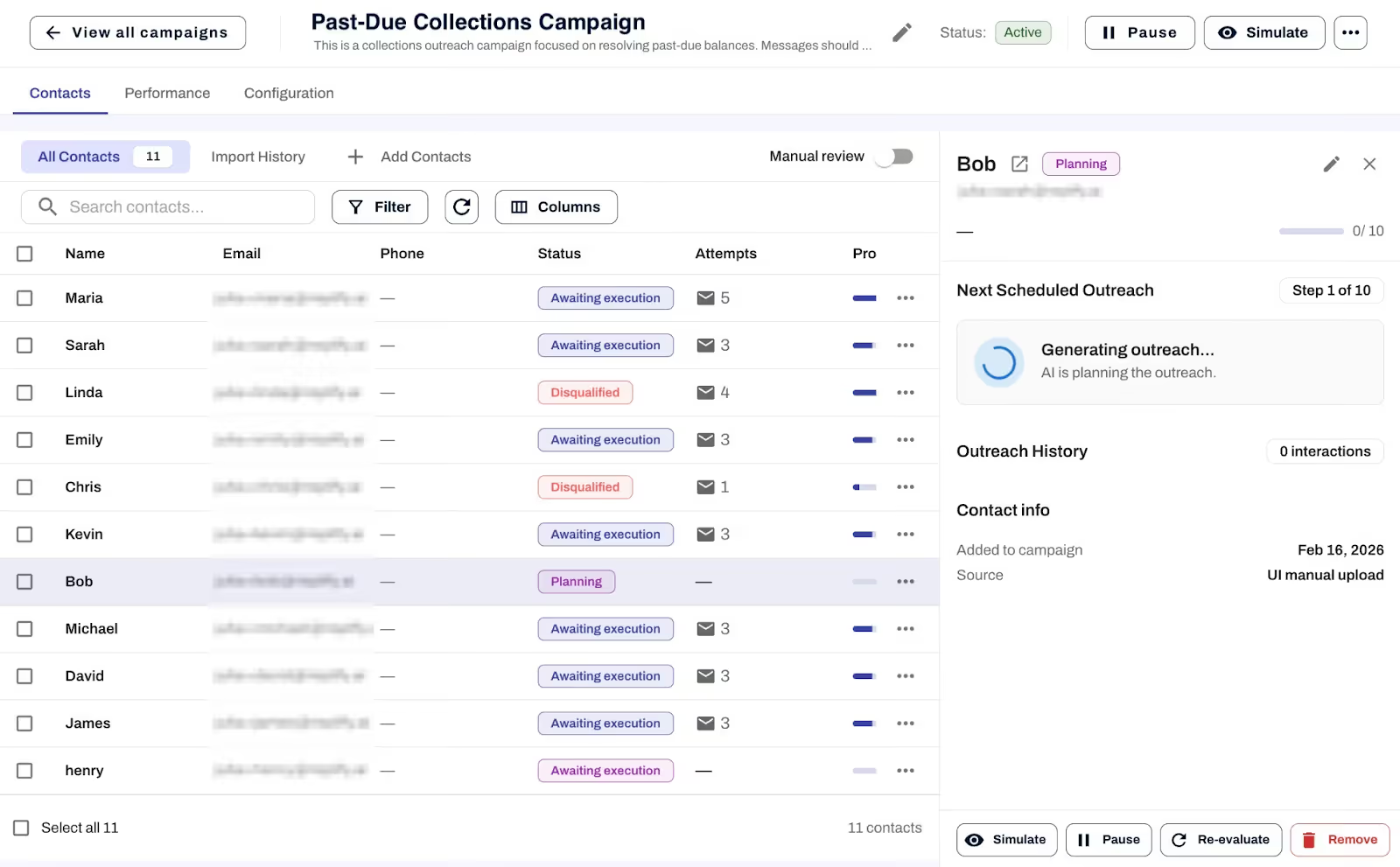
Step-by-step tutorials for two popular templates
Assistant settings, simplified
We reorganized assistant settings to make it clearer where different types of instructions belong.
Basic Info and Agent Preferences are now combined into a new Core Behavior page, so everything related to how your assistant behaves during conversations lives in one place. Channel-specific rules were moved here as well for better organization.
Anything that happens after a conversation ends now lives in a new section called Analysis Settings. This includes qualification instructions, summary instructions, and next steps instructions.
Better control over call recordings and live transfers
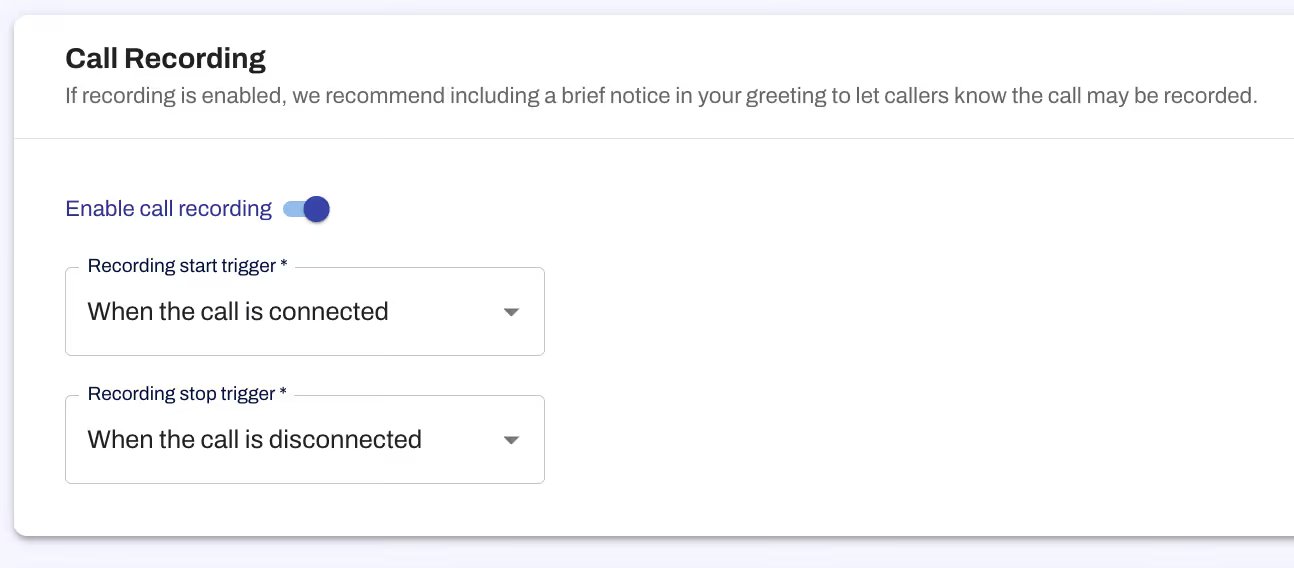
Phone Settings now give you clearer control over call recordings. You can turn recordings on or off and choose to automatically stop recordings when a live transfer occurs.
Live transfers are more flexible as well:
• You can transfer directly to an extension using a comma (for example, 12065551234,3).
• Transfers are handled more reliably without extra keypad instructions.
As always, thank you for your feedback and for continuing to build with us. More improvements are already on the way.
— The Replify Team
Not a Replify user yet? Book a demo to learn more.
Related Articles
Replify & ABC AI Agents Product Updates: Faster Inbox, Natural Voice Greetings, Redesigned Contacts
Replify, now part of ABC Fitness, shipped updates across Chatbot, Voice, Contacts, Inbox, and Connected Apps to make the platform faster for your front desk. See what's new.
.avif)
AI Receptionist and AI Sales Updates August 2026
Your AI receptionist and AI sales agents just got updated. Updates include editing live campaigns, faster setup, inbox management, and more

AI Case Studies at Gyms, Studios, and Health Clubs
Every AI receptionist and AI sales case study KPI in one place. 200+ gyms, studios, clubs, and salons.

Heading
Lorem ipsum dolor sit amet, consectetur adipiscing elit. Suspendisse varius enim in eros elementum tristique. Duis cursus, mi quis viverra ornare, eros dolor interdum nulla, ut commodo diam libero vitae erat. Aenean faucibus nibh et justo cursus id rutrum lorem imperdiet. Nunc ut sem vitae risus tristique posuere.
Heading
Lorem ipsum dolor sit amet, consectetur adipiscing elit. Suspendisse varius enim in eros elementum tristique. Duis cursus, mi quis viverra ornare, eros dolor interdum nulla, ut commodo diam libero vitae erat. Aenean faucibus nibh et justo cursus id rutrum lorem imperdiet. Nunc ut sem vitae risus tristique posuere.
Heading
Lorem ipsum dolor sit amet, consectetur adipiscing elit. Suspendisse varius enim in eros elementum tristique. Duis cursus, mi quis viverra ornare, eros dolor interdum nulla, ut commodo diam libero vitae erat. Aenean faucibus nibh et justo cursus id rutrum lorem imperdiet. Nunc ut sem vitae risus tristique posuere.
Heading
Lorem ipsum dolor sit amet, consectetur adipiscing elit. Suspendisse varius enim in eros elementum tristique. Duis cursus, mi quis viverra ornare, eros dolor interdum nulla, ut commodo diam libero vitae erat. Aenean faucibus nibh et justo cursus id rutrum lorem imperdiet. Nunc ut sem vitae risus tristique posuere.
Heading
Lorem ipsum dolor sit amet, consectetur adipiscing elit. Suspendisse varius enim in eros elementum tristique. Duis cursus, mi quis viverra ornare, eros dolor interdum nulla, ut commodo diam libero vitae erat. Aenean faucibus nibh et justo cursus id rutrum lorem imperdiet. Nunc ut sem vitae risus tristique posuere.
Heading
Lorem ipsum dolor sit amet, consectetur adipiscing elit. Suspendisse varius enim in eros elementum tristique. Duis cursus, mi quis viverra ornare, eros dolor interdum nulla, ut commodo diam libero vitae erat. Aenean faucibus nibh et justo cursus id rutrum lorem imperdiet. Nunc ut sem vitae risus tristique posuere.